Stop shouting names. Run your salon floor from one screen.
SaloonQ organizes every visit — reception, multi-service journeys, section queues, and a live waiting-room display — so customers know when they're up, staff stay coordinated, and you see everything in realtime. One branch or many.
 Salmiya Branch
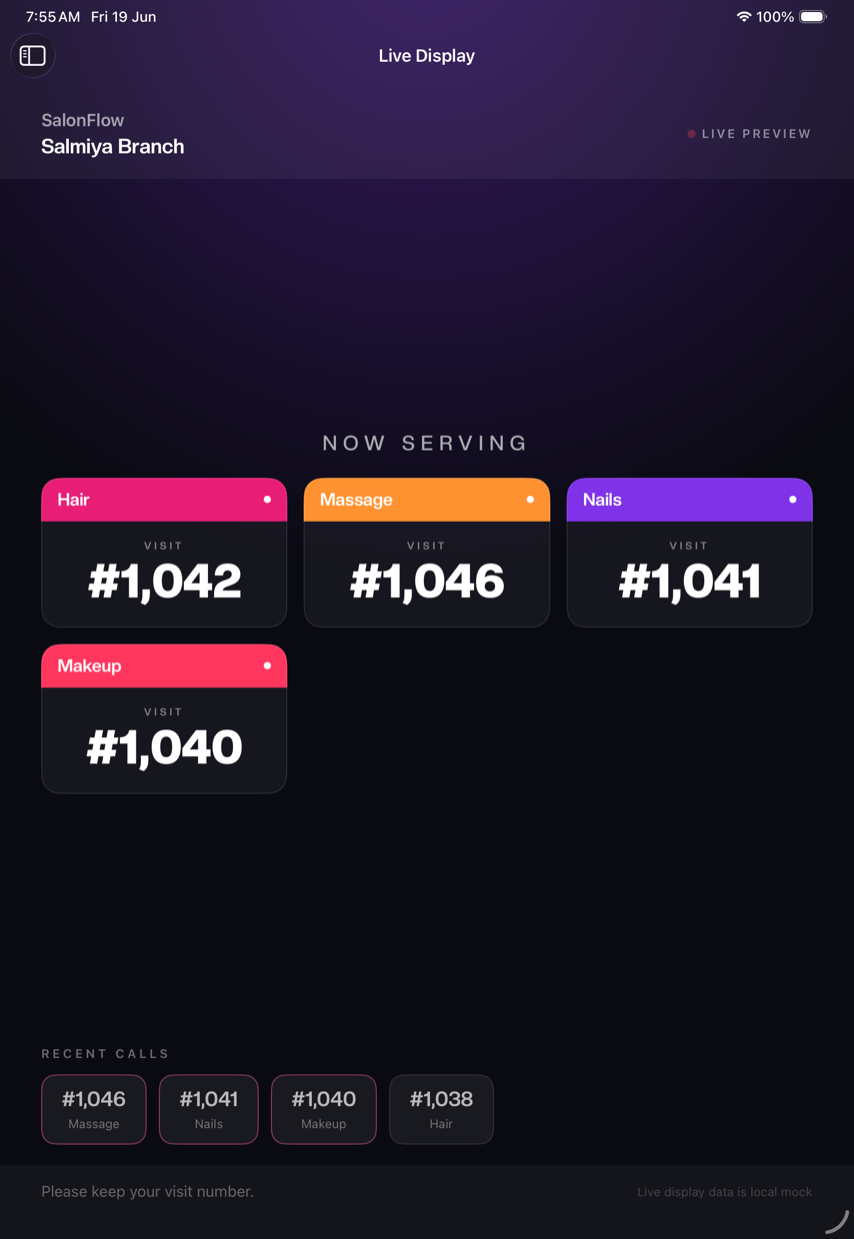
Your waiting room, live — on Android TV, iPad, or any browser screen. Your colors, your logo.
Explore SaloonQ using Demo Mode
A fully working sample salon — the queue, live display, and dashboard.
What is SaloonQ?
SaloonQ is a salon operations platform that combines customer queue management, live display screens, reception workflows, staff coordination, thermal printing, realtime synchronization, and multi-branch management for iPad and web. It is purpose-built for salons and beauty centers — not a point-of-sale — and works alongside whatever payment system you already use.
Busy salons don't break because of bad stylists. They break at the front desk.
If any of this sounds like a Saturday rush, you're not alone.
See the fixCalling customers by hand
Reception shouts names or walks the floor to find who's next — and customers miss their turn.
Queue confusion
Nobody knows the real order across hair, nails, and makeup. “Who's next?” every five minutes.
Staff coordination gaps
Stylists don't know which client is theirs or what's next. Idle chairs sit beside long waits.
Anxious waiting
With no visible “now serving,” the room feels slow even when it isn't — and tempers rise.
No floor visibility
Owners have no idea what's happening until the day is over. Decisions are guesswork.
One platform for the whole front of house
SaloonQ is a salon operations platform — a smart customer queue, a live waiting-room display, reception and staff-role management, multi-service journeys, realtime sync, thermal visit-slip printing, and multi-branch analytics. Not a POS bolt-on; a purpose-built system for salons and beauty centers that turns walk-in chaos into a calm, organized floor.
How it works
From the first walk-in to the last receipt.
- 1
Customer arrives
Reception greets a walk-in — or checks in a booked appointment — and starts a visit.
- 2
Visit created
Name and number captured in seconds.
- 3
Services assigned
Hair, nails, makeup — full multi-service journeys.
- 4
Sections call the customer
Fair, first-ready order; the live display shows their number.
- 5
Services completed
Slip printed, status updated in realtime.
- 6
Manager tracks everything
Live floor view and analytics — per branch.
See SaloonQ in action
Watch the 45-second walkthrough, then explore real screens — reception to live display to the owner dashboard.
A “now serving” board the whole room can read
Put an Android TV, iPad, or any browser screen in the waiting area. SaloonQ shows the now-serving visit for every section at once — Hair, Nails, Makeup — so the whole room always knows who's up, with no shouting and no confusion.
- Customers instantly know when it's their turn
- No shouting names across the salon
- Fully brandable — your colors, background, and logo
- A calmer, more professional waiting experience
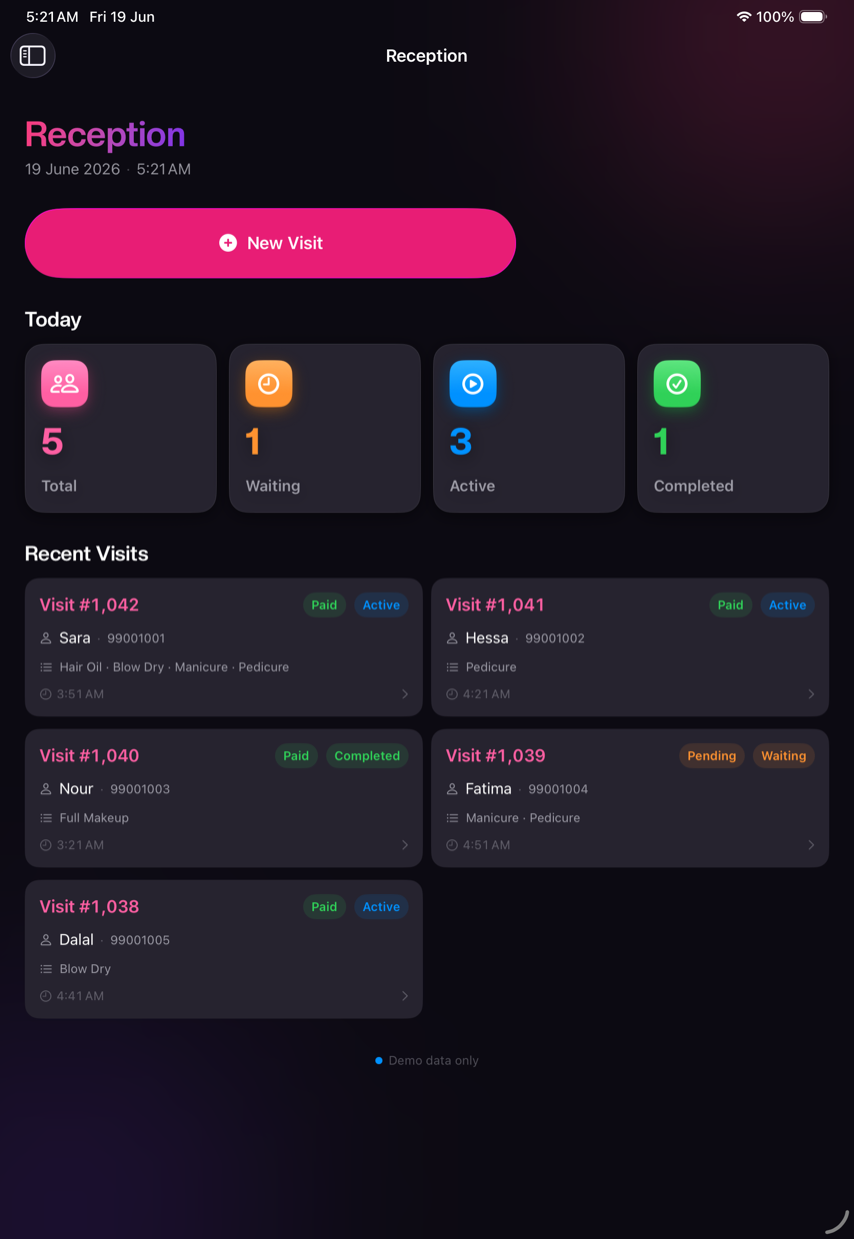
Turn every walk-in into an organized visit
Add customers, capture services, and start the visit in seconds. Today's totals — waiting, active, completed — are right there at a glance.
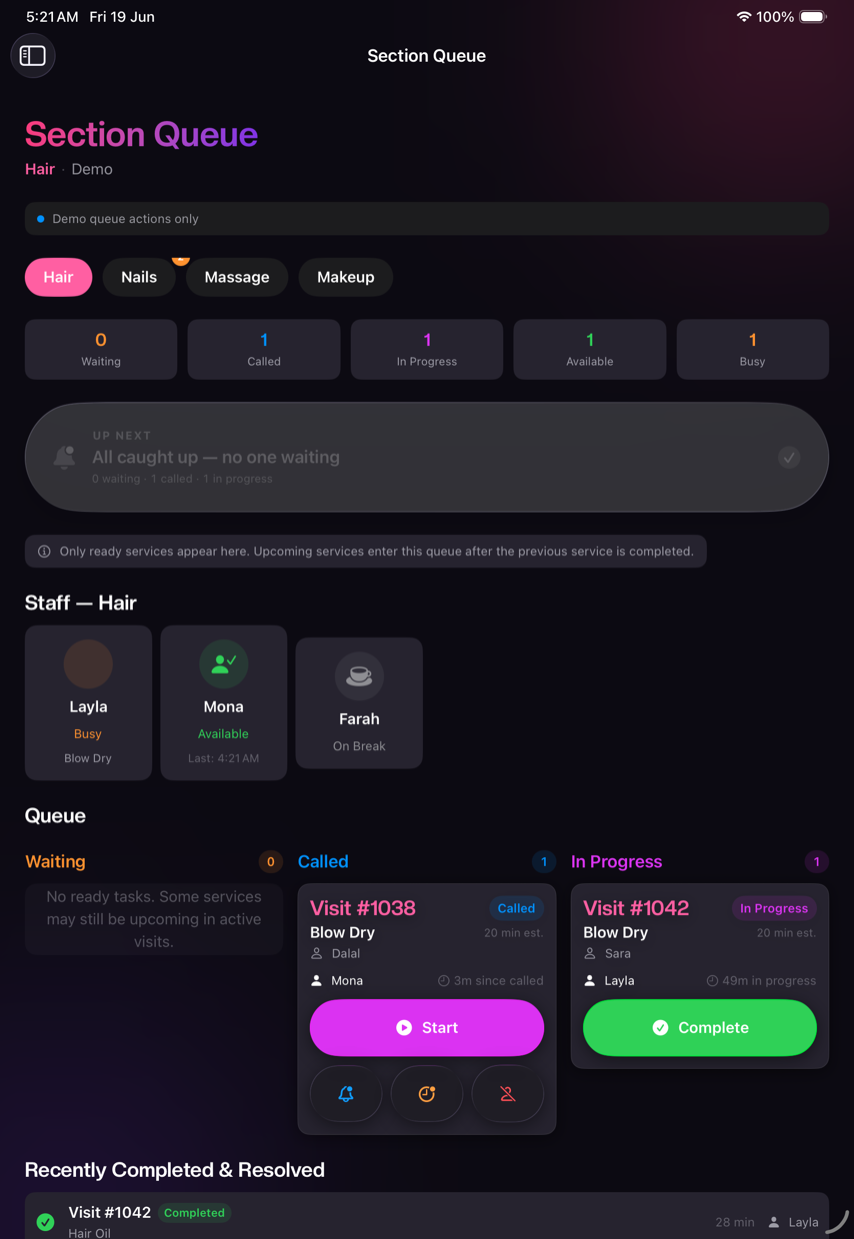
Each section calls its next ready customer
A fair, first-ready queue per section — walk-ins and checked-in appointments together, with booked clients prioritized and long-waiting walk-ins protected. Staff see who's waiting, called, and in progress, and call the next with one tap.
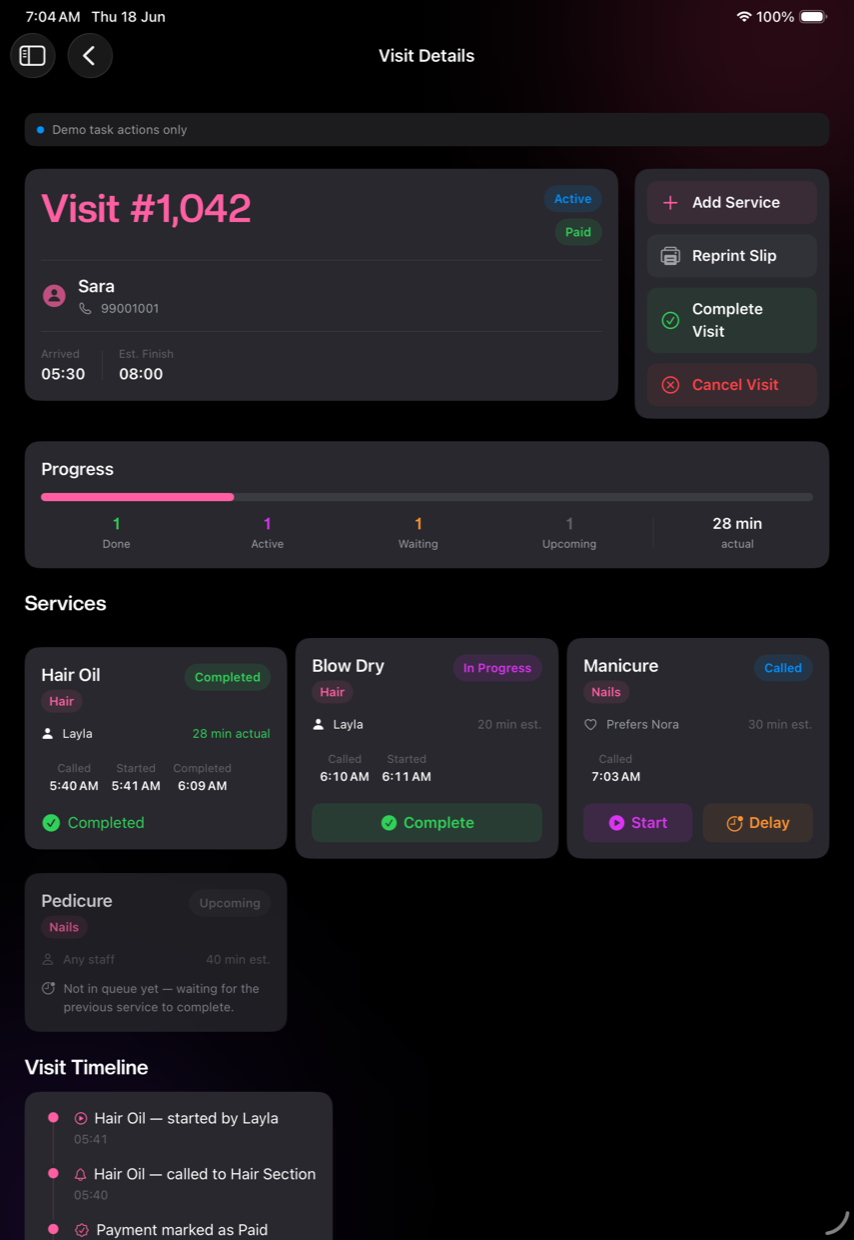
The whole customer journey in one place
Multi-service visits with live status and timing for every service, a progress bar, and a full timeline — so nothing slips.
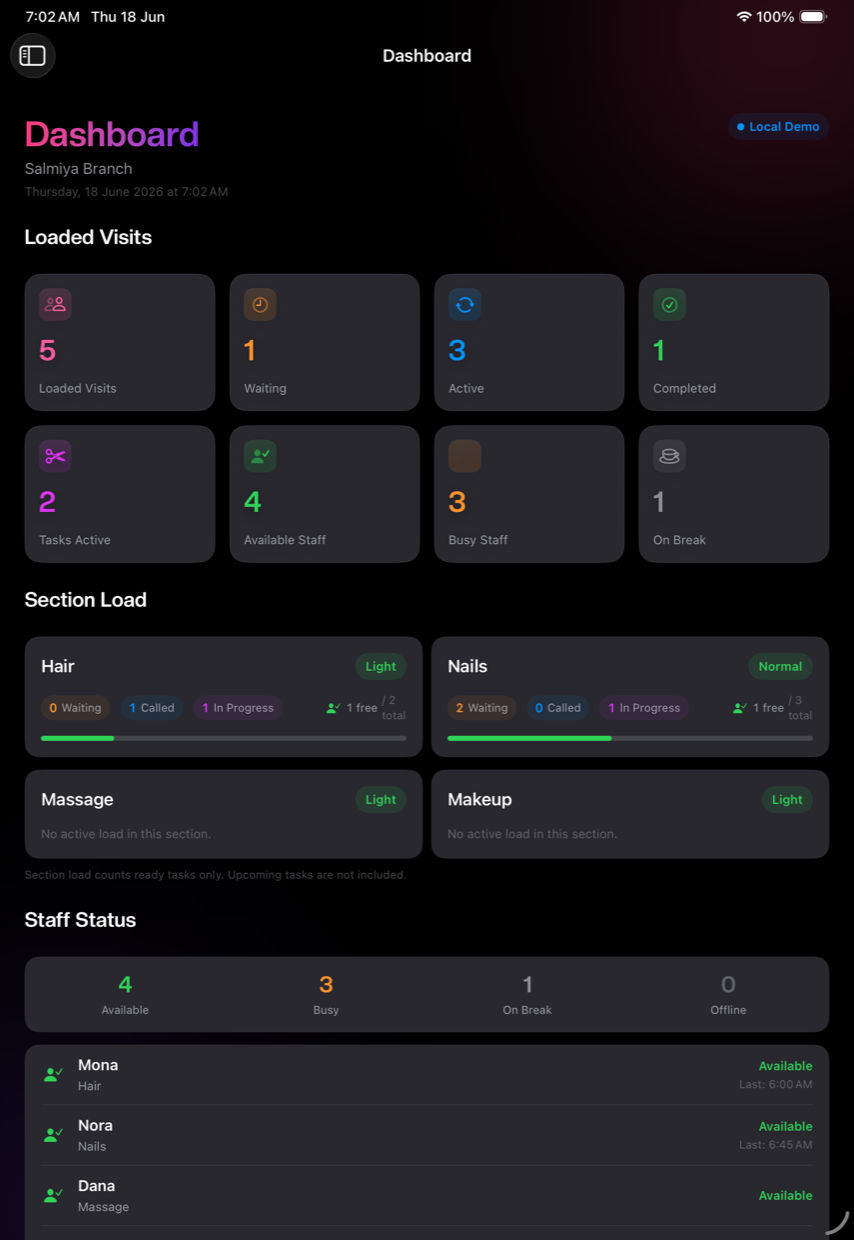
See your entire floor in realtime
Waiting, active, and completed visits, section load, and staff status — live, on web or iPad, for one branch or many.
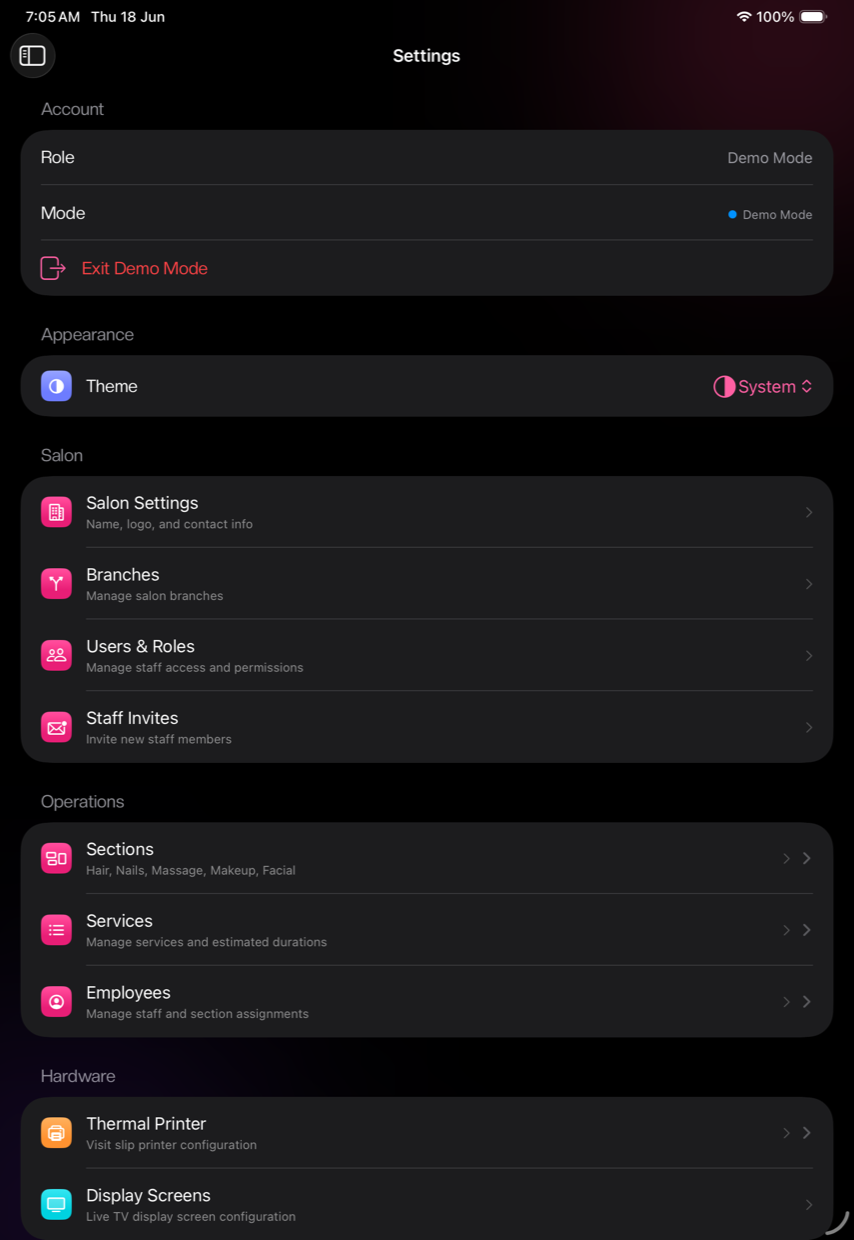
Configured your way, in minutes
Branches, sections, services, staff roles and permissions, and thermal-slip printing — all from Settings. No onboarding call.
What changes for your salon
Outcomes you'll feel from day one.
Faster customer flow
Fair first-ready queueing keeps chairs full and lines moving.
Better staff utilization
Everyone sees what's next — fewer idle stylists, fewer bottlenecks.
Less waiting frustration
A visible “now serving” board calms the room.
Real management oversight
Know your floor in realtime — not at closing time.
Consistency across branches
The same workflow and visibility at every location.
Professional touch
Printed visit slips and a calm, organized experience customers notice.
Before & after SaloonQ
Don't take our word for it — run the floor yourself
Walk through every screen above, then download SaloonQ and tap Continue in Demo Mode for a fully working sample salon — the queue, the live display, and the dashboard. No account, no card.
Simple pricing
Save up to 48% with annual billing. Subscribe in the iOS app — billed securely through your Apple ID, cancel anytime.
Basic
The full app, for a single branch
≈ $33.33/mo · save 33%
Save $199.89 a year
- Smart customer queue & live display
- Reception, sections, staff roles & appointments
- Realtime dashboard & analytics
- Thermal & browser ticket printing
Pro
For multi-branch salons & chains
≈ $41.67/mo · save 48%
Save $459.89 a year
- Everything in Basic
- Multiple branches
- Create & manage branches from one account
- Cross-branch visibility & management
Not sure yet? See it in action or try Demo Mode free in the app — no card required.
Questions salon owners ask
Everything you need before you try it.
What is SaloonQ?
SaloonQ is a salon operations platform: a smart customer queue, a live waiting-room display, reception and staff-role management, multi-service customer journeys, realtime sync, thermal visit-slip printing, and multi-branch analytics. It runs on iPad and iPhone, with a web dashboard and an Android companion app for owners, managers, and reception, plus a dedicated Android TV app for the waiting-room display.
Is SaloonQ available on Android?
Yes. The SaloonQ app on Google Play runs reception and the queue on an Android phone or tablet, and SaloonQ Display TV turns any Android TV into your waiting-room board — both are free downloads. Subscriptions themselves are purchased inside the iOS app on iPhone or iPad; once your salon is subscribed, sign in from Android, the web, or the Android TV display too.
Is SaloonQ a POS or payment system?
No. SaloonQ is an operations and queue platform, not a point-of-sale. It organizes the front of house — walk-ins, queues, sections, staff, and the waiting-room display — and works alongside whatever POS or payment system you already use.
How does the salon queue work?
Reception adds each walk-in as a visit, and checked-in appointments join the same queue automatically. Customers flow through your sections (hair, nails, makeup, and more) in a fair, first-ready order — booked clients are called first, and a walk-in who has waited past your limit is bumped up so no one is forgotten.
Do appointments and walk-ins share one queue?
Yes. Checked-in appointments and walk-ins run in one fair queue with a single visit-number series. Booked clients get priority, and a walk-in who has waited longer than your set limit (30 minutes by default) is automatically promoted so appointments can't keep skipping them.
How does the live waiting-room display work?
Put an Android TV, iPad, or any browser screen in the waiting area and SaloonQ shows a 'Now Serving' board — one entry per section, so Hair, Nails, and Makeup can each show who they're serving at the same time. On Android TV, install the SaloonQ display app and pair it in seconds by scanning a QR code or entering a short code from your iPad. The room always knows who's up, which removes confusion and shouting names.
Can I brand the waiting-room display?
Yes. The live display is fully customizable — set your own colors, background, and salon logo so the waiting-room screen looks like your brand, not a generic board.
Do customers need to install an app?
No. Customers never install anything. They simply get a visit number at reception and watch the live display for their turn.
What devices do I need?
An iPad or Android tablet at reception and on the floor (iPhone and Android phones are also supported), an Android TV (or any TV or screen) for the live waiting-room display, and a web browser for the owner/manager dashboard. A thermal receipt printer is optional for visit slips.
What's the difference between Basic and Pro?
Only the number of branches. Both plans include the full app — customer queue, live display, reception, sections, appointments, dashboard, analytics, ticket printing, and staff logins. Basic covers one branch; Pro lets you create and manage multiple branches with cross-branch visibility.
Can I run multiple branches from one account?
Yes — that's the one thing Pro adds. Pro lets you create and manage multiple branches from a single account, each with its own queues, staff, and reports, plus cross-branch visibility. Basic covers a single branch with the full feature set.
What staff roles and permissions are supported?
Owners, managers, reception, and section staff each get role-based access. Everything syncs live across devices, and staff can sign in with a station code or their own account.
Does SaloonQ print customer tickets?
Yes. It prints visit slips — number, services, and section — from a thermal receipt printer or any browser printer, with an optional silent local-print agent for USB thermal printers.
Is everything realtime across devices?
Yes. Reception, section queues, the live display, and the dashboard all update in realtime, so reception, staff, and managers always see the same up-to-date floor.
How much does SaloonQ cost?
Basic is $49.99/month or $399.99/year (save 33%). Pro is $79.99/month or $499.99/year (save 48%). Prices are in USD and billed securely through your Apple ID.
Is there a free trial or demo?
You can explore the full app instantly with built-in Demo Mode — sample salon data, no account and no card required. Download SaloonQ and tap 'Continue in Demo Mode' to try the queue, live display, and dashboard.
How do I subscribe, change, or cancel my plan?
Subscribe inside the iOS app on iPhone or iPad to unlock the app, the web dashboard, and the Android companion app. Because billing runs through your Apple ID, you can change or cancel anytime from Settings on your iPhone or iPad — the Android app doesn't sell subscriptions directly.
How long does setup take?
Minutes. Create your salon, add your branch, sections, services, and staff, and you're ready to take your first walk-in. No onboarding call required.
Is my salon's data secure?
Each salon can only access its own data, protected by authentication and row-level security. Payment details are handled entirely by Apple — SaloonQ never sees or stores your card.
Give every customer a number — and a calm waiting room.
Set up your salon in minutes. Try it free with Demo Mode.